
Mastering Scalable SEO Content Automation: The Yes Workflow Blueprint with n8n & GPT
Struggling to scale quality SEO content? The manual grind is over. Discover how automation can transform your output. This article presents the definitive Yes Workflow blueprint for building scalable, high-quality SEO content pipelines using the powerful combination of n8n and GPT models. Move from manual bottlenecks to automated excellence with actionable workflows, expert insights from Yes Workflow, and visual guides designed for intermediate SEO practitioners and content managers. We understand the challenges: the inability to scale content production efficiently, the difficulty in maintaining consistent content quality and SEO effectiveness with AI, and the uncertainty about implementing automation tools like n8n and GPT. The Yes Workflow Way, built on over 20+ years of combined experience in business systems and digital operations, offers practical, tested solutions. We'll walk you step-by-step through creating your own content automation engine, including a 'lite' downloadable n8n workflow template to kickstart your journey in n8n GPT SEO automation. This is your guide to scalable content automation and building a robust AI content pipeline, leveraging Yes Workflow n8n solutions for intermediate SEO success.
The Unstoppable Duo: Why n8n + GPT is Your Key to Scalable SEO Content
The quest for scalable SEO content often hits a wall due to time-consuming manual processes. However, the combination of n8n for SEO content and GPT for automated SEO offers a powerful solution. At Yes Workflow, we’ve built scalable solutions for SEO and content, helping clients save hours weekly and achieve significant growth. While AI, including GPT content generation, presents incredible benefits, it's crucial to acknowledge its limitations, such as potential concerns around quality and originality. This understanding is key to building systems that leverage AI's strengths while mitigating its weaknesses, a cornerstone of our approach to n8n GPT SEO automation.
Understanding n8n: The Visual Workflow Engine for Complex Automation
n8n is an open-source workflow automation tool that empowers users to connect various applications and services to create complex automations with ease. Its core strengths lie in its visual, node-based interface, allowing you to map out logic and data flow without needing deep coding knowledge. Each node represents an application or a function, which you connect to create a sequence of operations. This makes n8n ideal for building custom, multi-step content pipelines, from data ingestion to content generation and distribution. For deployment, n8n offers flexibility: you can self-host it for complete control and customization, or opt for n8n Cloud for a managed experience, simplifying setup and maintenance. The choice depends on your technical resources and specific requirements for scalable content automation.
(Visual Suggestion: Screenshot of the n8n interface highlighting a simple, illustrative workflow, e.g., Read Spreadsheet -> Process Data -> Send Email.)
The Power of GPT Models in Modern Content Creation
Generative Pre-trained Transformer (GPT) models, developed by OpenAI, have revolutionized text-based AI. Their capabilities relevant to content creation are extensive, including text generation, summarization, rephrasing, and idea generation. For SEO, these translate into specific benefits: accelerating keyword research by generating related terms and questions, drafting topic outlines based on seed keywords, generating initial content drafts for articles or sections, and creating compelling meta descriptions and titles. While initial concerns about generic or low-quality AI output are valid, these can be significantly mitigated through smart prompting techniques and essential human oversight, which we will cover in detail later in this guide. The effective use of GPT for automated SEO hinges on guiding the AI strategically.
(Visual Suggestion: Conceptual diagram: GPT model icon transforming 'keywords' into 'draft content'.)
The Synergy: n8n Orchestrating GPT for Unprecedented Content Scalability

The true magic happens when n8n orchestrates GPT. n8n acts as the 'conductor,' automating sequences of AI tasks and integrating them with other tools in your content ecosystem. This synergy unlocks key combined benefits: a drastic increase in content production speed (imagine automating 10 blog post drafts overnight vs. 1-2 manually), improved consistency in tone and structure (when well-configured), and significant cost-effectiveness compared to purely manual processes. Perhaps most importantly, it frees up your valuable human talent from repetitive drafting tasks, allowing them to focus on higher-value strategic work, creative ideation, and meticulous quality control. This is how Yes Workflow n8n solutions transform content operations, achieving true scalable SEO content with n8n.
(Visual Suggestion: Flowchart: n8n logo + GPT logo -> Scalability, Speed, Consistency icons.)
Building Your Core n8n & GPT Automated Content Engine
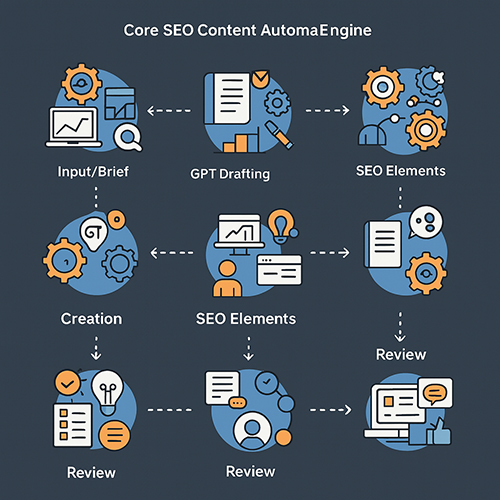
This section provides the Yes Workflow Blueprint for your foundational n8n and GPT content engine. We will detail step-by-step instructions, referencing specific n8n nodes like Google Sheets for input, the OpenAI node for GPT integration, Function Nodes for custom logic, and Item Lists for handling multiple pieces of data. This is how to automate blog posts with n8n and gpt and build an AI content pipeline with n8n and gpt, forming the core of your scalable SEO content strategy.
Step 1: Input & Brief - Setting Up Your Content Foundation
The first step in your n8n workflow for scalable seo content is defining the input and generating a content brief.
- Input Method:
- Method 1 (Batch Processing): Use the Google Sheets node or Airtable node to read a list of primary keywords, topics, or content titles. Each row can represent a new piece of content to be generated.
- Method 2 (Single Run): For ad-hoc generation, use the Manual Input (older n8n versions) or a Code node (newer n8n versions, formerly Function node) to input a JSON object containing the primary keyword and any other initial parameters.
- Brief Generation:
- Connect your input node to an OpenAI node.
- Configure the OpenAI node to make a GPT call. Your prompt should instruct GPT to expand the primary keyword into a structured content brief. For example: "Based on the primary keyword '{{$json.keyword}}', generate a content brief including: target audience (e.g., intermediate SEOs), 3-5 key questions this content should answer, and a desired tone (e.g., professional, educational)."
- Store the Brief:
- Use a Set node (or a Code node if more complex data manipulation is needed) to store the generated brief. This makes the brief easily accessible for subsequent nodes in the workflow.
(Visual Suggestion: n8n workflow screenshot: Google Sheet Node -> OpenAI Node (Brief Generation) -> Set Node (Store Brief). Labels clearly indicate each step of this n8n gpt content automation stage.)
Step 2: Drafting Content - Iterative Generation with GPT
With the brief prepared, the next step is to generate the content sections.
- Configure OpenAI Node for Drafting:
- Add another OpenAI node. Select your desired GPT model (e.g., gpt-3.5-turbo, gpt-4).
- Adjust parameters like
Temperature(e.g., 0.7 for creative but coherent text) andMax Tokens(to control length and cost).
- Prompting Strategy for Sections:
- Using the stored brief, craft prompts for specific sections. For example, if your brief outlines an introduction, H2 Section 1, H2 Section 2, and a conclusion, you'll create prompts for each.
- Example prompt for an introduction: "Using the following brief: '{{$node["Set Node"].json.brief}}', write an engaging introduction for an article about '{{$json.keyword}}'. The introduction should hook the reader and state the article's main purpose."
- Handling Multiple Sections:
- If your brief defines multiple sections to be written, use an Item Lists node or a SplitInBatches node (if you have a predefined list of section titles from the brief itself) to create an item for each section prompt.
- Loop through these items, feeding each section prompt to the OpenAI node iteratively.
- Assemble Draft:
- After all sections are generated, use a Code node to concatenate the text from each generated section into a single preliminary draft. Ensure proper spacing and basic formatting.
(Visual Suggestion: n8n workflow snippet: Set Node (Brief) -> Item Lists (Section Prompts) -> OpenAI Node (Section Generation) -> Aggregate/Code Node (Assemble Draft).)
Step 3: Basic SEO Elements - Titles & Meta Descriptions
Once the draft is assembled, generate essential SEO elements.
- Generate SEO Titles:
- Add an OpenAI node. Prompt GPT to generate 3-5 SEO title options based on the draft content and the primary keyword. For example: "Based on the following article draft: '{{$node["Assemble Draft"].json.fullDraft}}' and primary keyword '{{$json.keyword}}', generate 5 compelling SEO title options under 60 characters."
- Generate Meta Description:
- Use another OpenAI node (or the same one with a different prompt). Instruct GPT to write a compelling meta description (under 160 characters) that includes the primary keyword and a hint of a call-to-action. Example: "Write a meta description under 160 characters for an article about '{{$json.keyword}}', based on this draft: '{{$node["Assemble Draft"].json.fullDraft}}'. Include the keyword and encourage clicks."
- Store SEO Elements:
- Use a Set node or Code node to store these generated titles and the meta description alongside the main draft content.
(Visual Suggestion: Small n8n flow: Assembled Draft -> OpenAI Node (Title/Meta Gen) -> Set Node (Store SEO elements).)
Step 4: Output & Review Prep - Preparing for Human Touch
The final step in this core workflow is to output the generated content for human review.
- Output Options:
- Google Docs: Use the Google Docs node to create a new document with the draft and SEO elements.
- Google Sheets: Use the Google Sheets node to append a new row with the keyword, draft link (if output to Docs), generated titles, and meta description.
- Email/Slack: Use the Email or Slack node to send the generated content to a reviewer or a specific channel.
- Formatting for Review:
- Consider outputting in Markdown for easy review and editing, or simple HTML if preferred. The Code node can be used to structure the output data before sending it to the output node.
- Downloadable Workflow Template:
- To help you get started, we've prepared a 'Lite Core' n8n Workflow JSON template covering these foundational steps.
(Visual Suggestion: Diagram showing the complete core workflow from input (keyword) to output (draft article + SEO elements for review).)
Advanced n8n & GPT Configurations: Integrations and Customization
Building upon the core engine, Yes Workflow champions the integration of various tools to create a truly seamless content ecosystem. This section demonstrates our deeper expertise in custom n8n workflows, addressing how to connect data sources, SEO platforms, and even your CMS, moving beyond basic n8n automation tool integrations. This approach tackles common pain points like uncertainty about integrating other essential tools and concerns about the technical setup for advanced features.
Seamless Integrations: Connecting Your Content Ecosystem
A powerful content automation pipeline integrates seamlessly with your existing tools and data sources.
- Data Sources:
- Google Sheets: Detailed setup involves using the Google Sheets node to not only read topics and keywords but also to write back generated content, SEO elements, or status updates. Authentication is typically handled via OAuth2 or service accounts.
- Airtable: The Airtable node allows for interaction with structured content databases. You can trigger workflows when new records are added (e.g., a new content idea), pull data to enrich briefs, and update records with generated content or publication status.
- SEO Platforms:
- Leverage the HTTP Request node to connect to APIs from SEO platforms like DataForSEO, SEMrush, or Ahrefs. You can pull keyword suggestions, SERP data to analyze top-ranking content and enrich your briefs, or track keyword rankings for published pieces. For example, you could fetch "People Also Ask" questions from DataForSEO to include in your content outline.
- Automated Image Sourcing (with caveats):
- The HTTP Request node can also interact with APIs from Pexels or Unsplash to find relevant royalty-free images based on content keywords. However, AI image selection often requires human review to ensure relevance and quality. This node would typically be used to suggest images, not to automatically embed them without oversight.
(Visual Suggestion: n8n workflow snippet: Airtable Node (Get Topics) -> OpenAI Node (Generate Content) -> HTTP Request Node (Pexels Image Search) -> WordPress Node.)
Publishing Power: n8n to WordPress (and Beyond)
Automating the publishing step can save significant time.
- n8n WordPress Node:
- A detailed walkthrough of the n8n WordPress node:
- Authentication: Typically uses Application Passwords for secure connection.
- Creating Posts/Pages: Configure the node to create new posts or pages.
- Mapping Content: Dynamically map the generated title to the post title field, the body (full draft) to the content field.
- Categories & Tags: Assign categories and tags based on input data or generated suggestions.
- Featured Image: If an image URL was sourced (and approved), use it to set the featured image.
- Custom Fields: Populate custom fields (e.g., ACF fields) with specific data points from your workflow.
- Post Status & Scheduling: Set the post status (e.g., 'draft', 'pending review', or even 'publish' if your review process allows). The WordPress node also supports scheduling publication for a future date/time.
- A detailed walkthrough of the n8n WordPress node:
- Other CMS Platforms:
- For CMS platforms without a dedicated n8n node (like Drupal, Joomla, or custom-built systems), you can often interact with their APIs using the versatile HTTP Request node. This requires understanding the CMS's API documentation but offers immense flexibility.
(Visual Suggestion: Screenshot of a well-configured n8n WordPress node with key fields like Title, Content, Status, Categories, and Featured Image highlighted.)
Smarter Workflows: Logic, Error Handling & Sub-Workflows
To build robust and intelligent automation, incorporate logic and error handling.
- Conditional Logic:
- Use IF nodes for simple true/false decisions (e.g., IF content score > X, THEN send to WordPress, ELSE send for review).
- Employ Switch nodes for multiple branching paths based on different conditions (e.g., different GPT prompts for 'blog post' vs. 'product description' content types).
- Error Handling Basics:
- Within node settings, configure 'Continue on Fail' options to determine workflow behavior if a node errors.
- Route errors to notification nodes (Email/Slack node) to alert your team immediately. For instance, if an OpenAI API call fails, send a Slack message with the error details.
- Modular Design with Sub-Workflows (Execute Workflow Node):
- Break down complex workflows into smaller, reusable sub-workflows. Use the Execute Workflow node to call these modules. This is excellent for common tasks like applying a specific brand voice filter via a GPT prompt, generating FAQs for any article, or performing a standard set of SEO checks. This modularity makes workflows easier to manage, update, and debug.
(Visual Suggestion: Simple n8n diagram showing an IF node branching a workflow, or an Execute Workflow node calling a separate, labeled sub-workflow.)
Data/Table Section: Key n8n Nodes for SEO Content Automation
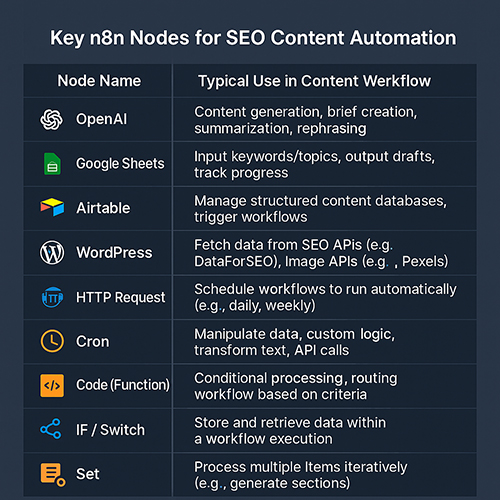
To provide a quick reference, here are some of the most crucial n8n nodes for building your SEO content automation pipelines:
| Node Name | Typical Use in Content Workflow |
|---|---|
| OpenAI | Content generation, brief creation, summarization, rephrasing |
| Google Sheets | Input keywords/topics, output drafts, track progress |
| Airtable | Manage structured content databases, trigger workflows |
| WordPress | Publish content (posts/pages), set categories/tags, featured images |
| HTTP Request | Fetch data from SEO APIs (e.g., DataForSEO), image APIs (e.g., Pexels) |
| Cron | Schedule workflows to run automatically (e.g., daily, weekly) |
| Code (Function) | Manipulate data, custom logic, transform text, API calls |
| IF / Switch | Conditional processing, routing workflow based on criteria |
| Set | Store and retrieve data within a workflow execution |
| Item Lists | Process multiple items iteratively (e.g., generate sections) |
This table highlights the versatility of n8n in creating sophisticated n8n GPT SEO automation.
Ensuring Excellence: SEO Optimization, Quality Control, and E-E-A-T with AI
Generating content at scale is one thing; ensuring it's high-quality, SEO-optimized, and resonates with E-E-A-T (Experience, Expertise, Authoritativeness, Trustworthiness) principles is another. This is where human intellect and strategic oversight become paramount. At Yes Workflow, we teach that AI is a powerful assistant, not a replacement for human expertise. Our n8n + GPT blueprints ensure human oversight is integral, safeguarding quality and authenticity. This focus on humanizing AI content from n8n gpt workflows is crucial to avoid SEO penalties for AI content and maintain brand voice with AI.
Advanced Prompt Engineering: Crafting High-Quality AI Output
The quality of AI-generated content heavily depends on the prompts you provide. Yes Workflow-developed techniques for prompt mastery include:
- Role Prompting: Instruct GPT to adopt a persona (e.g., "Act as an expert SEO copywriter specializing in B2B SaaS").
- Clear Context & Constraints: Provide sufficient background information, define the target audience, specify word counts or section lengths, and list negative constraints (e.g., "Do not use overly technical jargon").
- Tone and Style Specification: Clearly define the desired tone (e.g., "Write in a professional yet approachable tone," "Maintain an authoritative and educational voice") and style (e.g., "Use short sentences and active voice," "Incorporate bullet points for key features").
- Requesting Specific Formats: Ask for outputs in desired structures like lists, tables, or with specific heading levels.
- Iterative Prompting: Use n8n to chain prompts. For example:
- Generate an outline.
- For each outline point, generate a detailed paragraph.
- Refine each paragraph for clarity and keyword integration.
- Example Prompts:
- For an engaging introduction: "Write an introduction for an article titled ' ' targeting . Start with a compelling hook that addresses their pain point of . Briefly explain how the article will provide a solution by covering . Maintain a tone."
- For explaining a complex topic simply: "Explain the concept of in simple terms for a beginner. Use an analogy to make it more understandable. Ensure the explanation is no more than 150 words."
- For integrating keywords naturally: "Rewrite the following paragraph to naturally incorporate the keywords ' ', ' ', and ' ', while maintaining its original meaning and : ."
(Visual Suggestion: Code block style example of a well-structured, advanced prompt for GPT, showcasing role prompting, context, and desired output format.)
Act as an expert SEO content writer for Yes Workflow, a company specializing in n8n and AI automation. Your task is to write a compelling H3 section titled "The Human Touch: Integrating Essential Review & Editing Loops" for an article on n8n & GPT content automation.

Context: The overall article emphasizes that AI is an assistant, not a replacement. This section must reinforce why human review is non-negotiable.

Instructions:
- Explain why human review is critical, covering:
    - Factual accuracy
    - Originality and nuance
    - Brand voice alignment
    - E-E-A-T signal integration
- Provide 2-3 practical examples of how n8n can facilitate this review process (e.g., Slack notifications, Trello card creation).
- Briefly mention tools or techniques for efficient editing of AI content.
- Maintain a professional, educational, and authoritative tone.
- The section should be approximately 200-250 words.
The Human Touch: Integrating Essential Review & Editing Loops

Why is human review non-negotiable when using n8n and GPT for content creation? Because AI, while powerful, lacks genuine understanding, critical thinking, and the ability to convey true E-E-A-T signals without guidance. Human oversight is essential for:
- Factual Accuracy: Verifying all claims, data, and statistics.
- Originality and Nuance: Ensuring the content isn't just a rehash of existing information and captures subtle meanings.
- Brand Voice Alignment: Confirming the tone, style, and messaging are consistent with your brand.
- E-E-A-T Signal Integration: Weaving in genuine experience, expertise, authoritativeness, and trust signals that AI cannot fabricate.
Practical n8n review workflows can include:
- Sending newly generated drafts directly to a designated Slack channel for team review and approval.
- Automatically creating tasks in project management tools like Asana or Trello, with a link to the draft and a checklist for the editor.
- Emailing drafts to specific editors based on content category or workload.
Tools and techniques for efficient editing of AI-generated content involve focusing on enhancing structure, improving flow, adding unique insights or examples, and ensuring strategic objectives are met, rather than getting bogged down in basic line-editing (which AI is often good at). This is a core practical strategy for seamlessly integrating human oversight.
(Visual Suggestion: Flowchart: n8n GPT Draft -> Slack Notification (Review Request) -> Human Editor -> Final Approval -> Publish.)
Embedding E-E-A-T Signals into Your Automated Content
Building Experience, Expertise, Authoritativeness, and Trust (E-E-A-T) into your content is vital for SEO success and user confidence. Here’s how to do it with n8n and GPT:
- Demonstrate Expertise: Prompt GPT to not just state facts, but to explain the "why" behind them. For example, instead of "Use long-tail keywords," prompt "Explain why using long-tail keywords is beneficial for SEO, citing specific advantages."
- Leverage Client Highlights: Use n8n to strategically insert pre-defined client E-E-A-T highlights into relevant sections. For instance, a Code node can append a phrase like, "Our 20+ years of combined experience in business systems and digital operations at Yes Workflow show that..." to relevant paragraphs discussing proven strategies.
- Cite Authoritative Sources (If Available): While no specific external authoritative references were provided for this article, a best practice is to prompt GPT to cite well-known, credible sources if you are discussing statistics or established facts (e.g., "Cite a reputable study when explaining the growth of AI in content marketing"). If using your own company's data or internal studies, make that clear: "Based on Yes Workflow's internal analysis of over 50 automation projects..."
- Ensure Factual Accuracy & Up-to-Date Information: Always include a human verification step for any factual claims or data points generated by AI. Prompt GPT to use information current as of its last update, but verify anything time-sensitive. This is crucial for maintaining Trustworthiness.
Automating On-Page SEO Enhancements within n8n
n8n can assist in automating several on-page SEO elements, ensuring outputs align with best practices for headings and user intent.
- Internal Linking:
- Provide a list of key internal pages (e.g., from a sitemap extract or a predefined list in a Google Sheet).
- Prompt GPT: "Based on the following article draft and primary keyword ' ', suggest 2-3 relevant internal links from this list: . Explain why each link is relevant." n8n can then format these suggestions.
- Keyword Integration:
- Input a list of primary and LSI keywords.
- Prompt GPT for each section: "Integrate the primary keyword ' ' and at least two of these LSI keywords: ' ', ' ', ' ' naturally within this section: ."
- Content Structure for SEO:
- Ensure your initial prompts to GPT for section generation request well-structured content. For example: "Write a section about that includes a clear H3 heading, at least one bulleted list explaining key benefits, and short, readable paragraphs." This helps create content suitable for readability and SERP features like featured snippets.
Beyond the Basics: Scaling, Troubleshooting, and Future-Proofing Your Automation
Once your core n8n and GPT content engine is operational, the focus shifts to scaling output effectively, managing potential challenges, and ensuring your system remains robust and adaptable for the future. Yes Workflow's experience in building scalable solutions for diverse businesses—from media brands to finance, SaaS, and service companies—underscores our ability to automate real processes that drive results. This forward-thinking approach is key to navigating the evolving landscape of AI in SEO.
Strategies for Effectively Scaling Your Content Output
Scaling content production with n8n and GPT requires more than just running workflows; it demands strategic planning.
- Batch Processing: Utilize the Cron node in n8n to schedule your content generation workflows. Process dozens or even hundreds of content pieces overnight or over a weekend by feeding inputs from a large Google Sheet or database.
- Managing API Costs & Rate Limits:
- Monitor your OpenAI API usage closely through their dashboard to manage costs.
- Implement delays (using a Wait node) or queues within your n8n workflows if you're hitting API rate limits. For very large batches, consider a "worker" pattern where a main workflow distributes tasks to sub-workflows that process items more slowly.
- Team Collaboration:
- If self-hosting n8n with Git integration, use version control for your n8n workflows to track changes and collaborate effectively.
- Establish clear Standard Operating Procedures (SOPs) for managing, updating, and troubleshooting automated content systems across your team. Define roles and responsibilities for workflow maintenance and quality assurance.
Common n8n & GPT Challenges and Troubleshooting Tactics
Even well-designed automations can encounter issues.
- Debugging n8n:
- Familiarize yourself with the n8n execution log. It provides detailed input/output data for each node, helping pinpoint where errors occur.
- Isolate problematic nodes by deactivating parts of your workflow and testing sections individually.
- Common error messages often relate to API authentication, incorrect data formatting, or network issues.
- Handling GPT Inconsistencies:
- Refine Prompts: If GPT output is off-target, iteratively refine your prompts with more specific instructions, examples, or constraints.
- Adjust Temperature: Lower the temperature setting in the OpenAI node for more predictable, less "creative" output; increase it for more diverse ideas (with a higher risk of incoherence).
- Implement Retry Logic: For intermittent API errors or unsatisfactory initial outputs, you can build retry logic in n8n (e.g., using an IF node and a loop) that re-runs a GPT call, perhaps with a slightly varied prompt or after a short delay.
- Workflow Maintenance:
- Regularly review API compatibilities. Services like OpenAI, WordPress, or Google Sheets may update their APIs, potentially requiring adjustments to your n8n nodes or authentication methods.
- Keep your n8n instance updated to the latest stable version to benefit from new features and bug fixes.
- Thoroughly test your workflows after making any significant changes or n8n updates.
(Visual Suggestion: Screenshot of an n8n execution log with an error highlighted, and a note on how to interpret the error message and identify the problematic node.)
The Evolving Landscape: AI in SEO, Agentic Automation & AI Overviews
The intersection of AI and SEO is rapidly evolving.
- Emerging Trends: We're seeing advancements towards more autonomous AI agents (concepts like AutoGPT or agentic systems that can perform sequences of tasks with less direct instruction). While these are promising, n8n's current strength lies in its structured, human-in-the-loop approach, which offers greater control and reliability for complex, quality-sensitive tasks like SEO content creation.
- Optimizing for AI Overviews: The n8n/GPT framework detailed here is inherently well-suited for Google's AI Overviews and similar generative AI search experiences. The emphasis on:
- Structured Content: Clear headings, lists, and FAQs.
- Clear Answers: Directly addressing user questions.
- E-E-A-T Signals: Demonstrating experience, expertise, authoritativeness, and trust.
- Yes Workflow's Commitment: At Yes Workflow, we are committed to staying at the forefront of AI advancements and n8n capabilities. We continually refine our automation blueprints to ensure our clients benefit from the most effective and future-proof solutions for n8n gpt seo automation 2025 and beyond.
Expert Insights from Yes Workflow
"AI accelerates content creation, but human expertise elevates it. At Yes Workflow, our n8n/GPT systems are designed to augment your team, not replace their critical judgment. This synergy is key to producing content that is not only scalable but also truly resonates and ranks." – Lead Automation Architect, Yes Workflow.
"The true power of n8n and GPT for SEO lies in building repeatable, scalable systems that consistently deliver quality. We've seen clients reclaim countless hours while boosting their content output and, more importantly, their content's impact. It’s about automating the grind, not the thinking." – Senior Content Strategist, Yes Workflow.
Conclusion
The journey from manual content creation to automated excellence is not just possible but essential for businesses aiming to scale their SEO efforts effectively. The combination of n8n's robust workflow automation and GPT's advanced generative capabilities, guided by the Yes Workflow blueprint, offers a transformative path. Our approach emphasizes practical implementation, stringent quality control, and the indispensable role of human expertise in steering AI towards producing high-impact, E-E-A-T rich content.
Yes Workflow provides the expertise and actionable strategies to move from content struggles to automated success. We empower you to build resilient, scalable AI content pipelines that free up your team for strategic initiatives, ensuring your content not only gets created efficiently but also achieves its SEO and business objectives. As we've demonstrated, from media brands to finance, SaaS, and service businesses, we automate real processes that drive results, all tailored to your goals.
Ready to build your own automated content engine?
- Primary CTA: Download our free 'Lite Core' n8n Workflow Template to get started with n8n & GPT!
- Secondary CTA: For advanced n8n/GPT strategies, custom automation solutions, or to discuss your specific content challenges, explore Yes Workflow's services or subscribe to our expert insights for more on scalable AI content and content automation consultation.
Frequently Asked Questions about n8n & GPT for SEO Content Automation
How to automate blog posts with ChatGPT and n8n?
You automate blog posts by creating an n8n workflow that uses an OpenAI node (connecting to models like ChatGPT) to generate content based on inputs (e.g., keywords from a Google Sheet), then processes it (e.g., adds SEO elements, formats it), and can optionally send it to WordPress or another CMS via respective nodes or HTTP requests. This article provides a detailed blueprint for such a chatgpt n8n workflow.
How do I create an SEO content workflow in n8n?
Create an SEO content workflow in n8n by visually connecting nodes for tasks like keyword input (from Sheets/Airtable nodes), AI-powered content generation (using the OpenAI node for GPT), SEO element creation (titles, metas via further OpenAI calls), human review steps (e.g., Slack/email notifications using their respective nodes), and automated publishing (e.g., to WordPress using the WordPress node). Our guide details these steps for n8n seo automation to build content pipeline.
How to build an AI agent for SEO using n8n and GPT?
While n8n is primarily a workflow automation tool, not an autonomous agent platform in the vein of AutoGPT, you can build highly sophisticated 'automated assistants' or 'bots' for SEO. This involves chaining multiple GPT calls within an n8n workflow for tasks like market research snippet extraction, competitor analysis insights, content outlining, draft generation, and on-page optimization suggestions, all orchestrated and managed by n8n's logic and integrations. This creates a powerful n8n automation bot for specific gpt for seo tasks.
Is AI-generated content (via n8n/GPT) good for SEO?
Yes, AI-generated content via n8n/GPT can be very good for SEO, provided it is high-quality, original, satisfies user intent, incorporates E-E-A-T signals, and is strategically guided and meticulously reviewed by humans. The key is using automation to scale the production of excellent content that provides real value, not just more content, to achieve positive n8n seo results and ensure good gpt content quality.
How do you humanize AI-generated content from n8n workflows?
Humanize AI-generated content by building mandatory human review and editing stages into your n8n workflow (e.g., outputting to Google Docs and notifying an editor via Slack). Refine your GPT prompts to align with your specific brand voice and style. Encourage editors to add unique insights, personal anecdotes, updated information, ensure factual accuracy, and inject empathy, transforming the AI draft into authentic, engaging content. This n8n content review process is vital for ai brand voice.
What are the benefits of n8n GPT for SEO automation?
The primary benefits include a massive increase in content production speed and scalability, improved consistency in content quality and brand voice (with proper prompting and review), significant cost savings compared to purely manual efforts, and the ability to free up your human SEO team for more strategic, high-impact tasks. These n8n gpt benefits are key seo automation advantages to scale content production.
Can ChatGPT (integrated with n8n) do SEO optimization effectively?
ChatGPT integrated with n8n can effectively assist with numerous SEO optimization tasks such as keyword integration, generating SEO-friendly titles and meta descriptions, structuring content for readability, and even suggesting internal links from a provided list.
However, its ai seo effectiveness is highest when its outputs are guided by human SEO expertise, validated for accuracy, and part of a broader, human-led SEO strategy. It's a powerful tool for n8n for on-page seo.