The Ultimate AI Content Pipeline: A Step-by-Step Guide to Automating SEO Articles with n8n & WordPress
Table of Contents
- Why Automate? The Strategic Shift from Manual Grind to a Scalable Content Engine
- Architecting the AI Content Pipeline: Your n8n, Google Sheets & WordPress Stack
- The Visual Blueprint: Building Your n8n Workflow Step-by-Step
- Quality Control: Building a Human-in-the-Loop System for E-E-A-T Content
- Frequently Asked Questions about n8n SEO Automation
- Download Your Complete Asset Package
The journey from a single keyword to a fully formatted, SEO-optimized article published in WordPress is riddled with manual, repetitive tasks. It's a disjointed process of juggling disconnected tools, struggling to scale content production, and constantly fighting to maintain quality and consistency. This manual grind is the single biggest bottleneck preventing content teams from reaching their true potential.
The solution is a unified, automated AI content pipeline. This isn't just a theoretical concept; it's a production-ready system that transforms your entire content operation. This article provides the definitive visual blueprint for intermediate users to build this exact workflow. At Yes Workflow, we specialize in building these exact high-quality article generation pipelines for SEO agencies and content teams, and now we're showing you precisely how to build your own automated SEO article generation engine using n8n.
Why Automate? The Strategic Shift from Manual Grind to a Scalable Content Engine
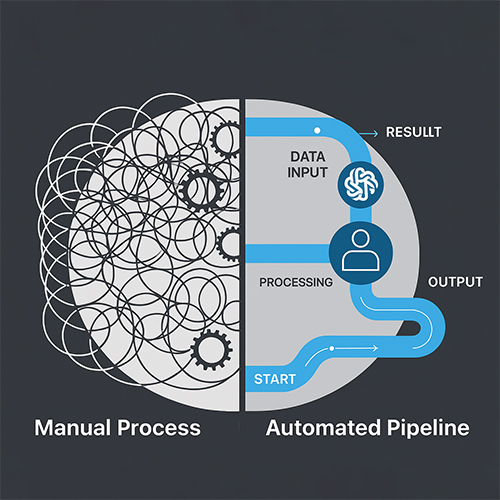
The move toward an automated content pipeline is more than an efficiency hack; it's a strategic necessity for any team serious about scalable content generation. The traditional, manual approach is fraught with hidden costs and limitations that actively hinder growth.
The Hidden Costs of Manual SEO Publishing
The time-consuming content generation process involves a surprising number of manual steps. Consider the typical workflow: keyword handoffs between spreadsheets and writers, draft management in shared documents, endless copy-pasting into the WordPress editor, tedious formatting adjustments, and manual entry of all SEO metadata. Each step is a potential point of failure. This process is not only slow but also has a high potential for human error—missed SEO fields, inconsistent formatting, broken links, and incorrect metadata can all slip through the cracks, damaging your SEO efforts. This creates a hard scalability ceiling; the only way to increase output is by hiring more people, which dramatically increases costs and management complexity.
The Automation Advantage: Scaling Content with Consistency
Automating your WordPress publishing process unlocks immense strategic advantages. The core benefits are massive time savings and a significant increase in publishing velocity. More importantly, it allows your team to shift its valuable human effort away from repetitive, low-value tasks and toward high-level strategy, creative ideation, and in-depth quality assurance.
An automated workflow enforces consistency at scale. Every single post adheres to the same brand voice, formatting rules, and on-page SEO best practices without deviation. This system effectively creates a centralized content operations hub, giving you a single source of truth for your entire content program.
Introducing Your Content Automation Tech Stack
This tutorial will use a powerful and accessible stack of tools to build our automated content publishing system:
- Google Sheets: This will serve as our 'mission control' center for inputting keywords and tracking the status of each article through the pipeline.
- n8n: This is the powerful, node-based automation 'engine' that connects all our tools and executes the workflow logic.
- OpenAI (or other LLMs): This is the 'creative brain' responsible for generating the article based on our prompts.
- WordPress: This is the final destination and publishing platform for our SEO content.
Architecting the AI Content Pipeline: Your n8n, Google Sheets & WordPress Stack
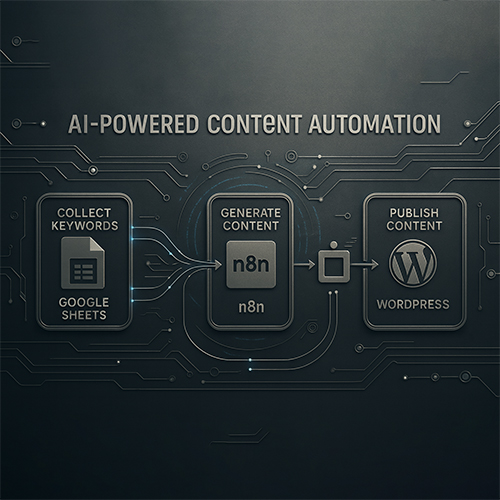
Before diving into the node-by-node build, it’s crucial to visualize the architecture and prepare the necessary components. This planning phase ensures a smooth and successful implementation.
Visualizing the End-to-End Workflow
Here is a high-level overview of the process we are about to build. This is the core architecture of our AI content pipeline:
- Trigger: A new row containing a target keyword is added to our Google Sheet.
- Fetch & Process: n8n detects the new row, fetches the keyword, and initiates the workflow.
- Generate: n8n sends the keyword to OpenAI with a structured prompt, requesting a complete, SEO-optimized article.
- Publish: n8n receives the AI-generated content and uses the WordPress REST API to create a new draft post, populating the title, body, and other relevant fields automatically.
This end-to-end flow handles the entire journey from a simple keyword to a draft post ready for review, all without manual intervention.
Core Components & Authentication
To begin, ensure you have the following prerequisites in place:
- n8n: A running n8n instance, either on n8n.cloud or a self-hosted server.
- Google Sheets API Access: Credentials to allow n8n to read and write to your Google Sheets.
- OpenAI API Key: You can obtain your API key from the OpenAI platform dashboard.
- WordPress Admin Access: You need administrator access to your WordPress site to create an Application Password. This is essential for secure, programmatic access via the REST API. For detailed instructions, refer to the official WordPress REST API Handbook.
Setting Up Your Google Sheet 'Mission Control'
Your Google Sheet is the simple, effective database that will manage the entire content pipeline. Create a new sheet with the following columns exactly as named:
keyword: The target keyword for the article.status: To track the article's progress (e.g., 'Pending', 'In Progress', 'In Review', 'Published').article_title: This will be populated by the workflow after the AI generates a title.article_body: This will be populated with the full HTML content of the article.wordpress_post_id: The ID of the created WordPress post, returned after successful publishing.wordpress_url: The URL of the new draft post.
This 'mission control' sheet provides a clear, at-a-glance overview of your entire automated content operation. This template is also included as part of the downloadable Asset Package.
The Visual Blueprint: Building Your n8n Workflow Step-by-Step
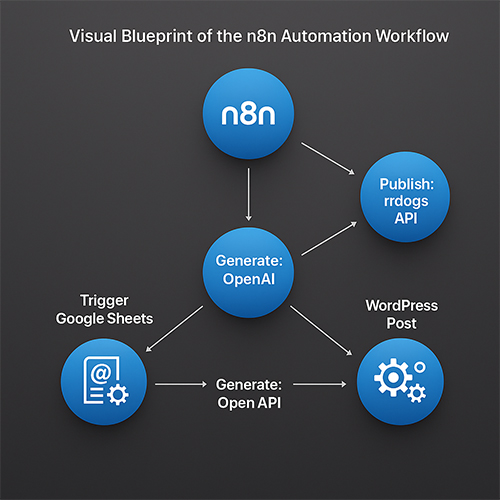
This section provides the step-by-step n8n content publishing guide. We will build the core workflow node by node, creating a powerful link between your Google Sheet, your AI model, and your WordPress site.
Stage 1: The Trigger - Reading New Keywords from Google Sheets
The entire automation begins with a trigger. We'll use the 'Google Sheets' node to watch for new keywords.
- Add a 'Google Sheets' node to your n8n canvas.
- Configuration:
- Authentication: Connect your Google account credentials.
- Resource: Set to
Sheet. - Operation: Set to
Read. - Sheet ID: Select your 'Mission Control' sheet.
- Range: Specify the range that contains your data, such as
A:F.
- Enable the 'Trigger on Row Added' option. This tells n8n to run this workflow only when a new row is added to the sheet.
- Test the node to confirm it can pull data correctly from your sheet.
Stage 2: The AI Brain - Generating a Structured Article with OpenAI
Next, we connect the 'OpenAI' node to act as our content generator.
- Add an 'OpenAI' node and connect it after the Google Sheets trigger.
- Configuration:
- Authentication: Add your OpenAI API Key.
- Resource: Select
Chat. - Model: Choose your preferred model (e.g.,
gpt-4-turbo). - Prompt: This is the most critical step. You must instruct the AI to return a structured output. Expert Tip: Requesting a JSON object with specific keys (
title,body) is far more reliable for automation than parsing plain text, as it guarantees a consistent data structure for the next step.
Use a prompt like this, dynamically inserting the keyword from the previous node using an n8n expression (
{{ $json.keyword }}):Act as an expert SEO content writer. Your task is to write a comprehensive, helpful, and SEO-optimized article about the following keyword: "{{ $json.keyword }}". The article must be well-structured, using H2s and H3s for subheadings. The tone should be professional and educational. Please return your response as a single, valid JSON object with two keys: 1. "title": A compelling, SEO-friendly title for the article. 2. "body": The full article content formatted in HTML. - Test the node to ensure it receives the keyword and generates a valid JSON response.
Stage 3: The Publisher - Sending the Article to WordPress via REST API
The final step is to publish the generated content. We'll use the versatile 'HTTP Request' node to communicate with the WordPress REST API.
- Add an 'HTTP Request' node after the OpenAI node.
- Configuration:
- Method:
POST - URL:
https://your-site.com/wp-json/wp/v2/posts(Replaceyour-site.comwith your actual domain). - Authentication:
Basic Auth. - Credentials: Select or create new credentials using your WordPress username and the Application Password you generated earlier.
- Body Content Type:
JSON. - Body: Construct the JSON payload to create the post. Use n8n expressions to map the data from the OpenAI node.
{ "status": "draft", "title": "{{ JSON.parse($json.choices[0].message.content).title }}", "content": "{{ JSON.parse($json.choices[0].message.content).body }}" } - Method:
- Test the node. If successful, you will see a new draft post appear in your WordPress admin dashboard. For advanced use cases, consult the n8n's HTTP Request node documentation.
Quality Control: Building a Human-in-the-Loop System for E-E-A-T Content
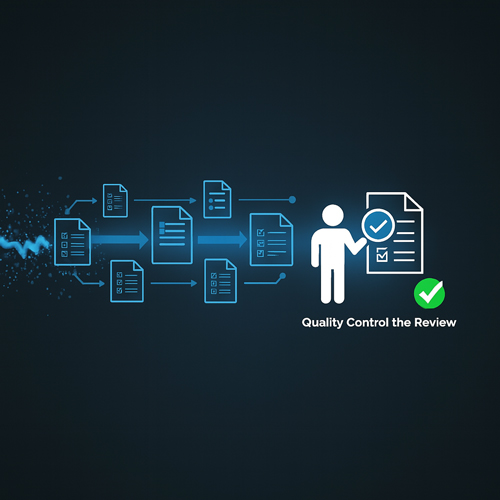
Automating content generation is powerful, but blindly publishing AI output is a recipe for disaster. To create truly valuable, E-E-A-T compliant AI articles and avoid penalties, human oversight is non-negotiable.
The Risks of Unchecked AI: Why Human Oversight is Non-Negotiable
A primary fear among content creators is the risk of Google penalties for AI content. It's crucial to understand Google's stance: its policies target spammy, low-quality content, not AI-generated content itself. The key is to adhere to the principles outlined in Google's helpful content system, which rewards helpful, reliable, people-first content.
Fully automated publishing without review introduces significant risks: factual inaccuracies, a robotic or generic tone, and a complete lack of genuine experience or novel insight. This is the type of low-quality content that ranking systems are designed to identify.
How to Implement a 'Human Review' Checkpoint in n8n
To solve this, we must build a 'human-in-the-loop' system. This is a simple but powerful modification to our workflow:
- Modify the Workflow: Instead of a final 'HTTP Request' node that publishes to WordPress, add a 'Google Sheets' node set to 'Update a Row'.
- Update the Sheet: Configure this node to find the original row and update the
article_titleandarticle_bodycolumns with the AI-generated content. Change thestatuscolumn to 'In Review'. - Human Review: A human editor now reviews the generated content directly in the Google Sheet. They can fact-check, edit for tone, inject unique insights, and improve the overall quality.
- Approve and Publish: Once satisfied, the editor changes the
statusto 'Approved'. A second, separate n8n workflow can be built to trigger on rows with the 'Approved' status, which then handles the final step of publishing to WordPress.
This checkpoint ensures that every piece of content benefits from human expertise before it goes live, safeguarding quality and E-E-A-T compliance.
Advanced Prompt Engineering for Maintaining Your Brand Voice
You can significantly improve the quality of the initial AI draft through advanced prompt engineering. Go beyond simple keyword prompts:
- Provide a Style Guide: Include a section in your prompt that details your brand's tone of voice, forbidden words, and stylistic preferences.
- Use Personas: Instruct the AI to adopt a specific persona. For example: "Act as an expert workflow strategist writing for an audience of technical marketers."
- Give Examples: Include a sample paragraph of your writing in the prompt and ask the AI to match its style and tone.
- Specify Formatting: Be explicit about formatting requirements. For example: "Use a professional yet educational tone. Format the output with H3s for sub-sections. Ensure paragraphs are short and easy to read."
Key Takeaways
- Automation Transforms Your Process: Building an AI content pipeline frees you from manual tasks, allowing you to focus on high-level strategy and content quality.
- The Core Stack is Accessible: With Google Sheets, n8n, OpenAI, and WordPress, you have a powerful and accessible tech stack to build a robust content engine.
- A Visual Blueprint is Key: This guide provides the clear, step-by-step, node-by-node instructions necessary to build a functional workflow from scratch.
- Quality Control is Essential: A 'human-in-the-loop' review system is the secret to creating high-quality, E-E-A-T compliant content at scale, building trust and avoiding the pitfalls of unchecked automation.
Frequently Asked Questions about n8n SEO Automation
How do you connect n8n with OpenAI and WordPress?
You connect them using their respective APIs within n8n. OpenAI is connected using its dedicated node and an API key, while WordPress is typically connected via the HTTP Request node using the WordPress REST API and an Application Password for secure authentication.
Does Google penalize AI-generated content?
No, Google does not inherently penalize AI-generated content; it penalizes low-quality, unhelpful content, regardless of how it's created. As long as your AI-assisted content is original, high-quality, and follows E-E-A-T principles, it aligns with Google's guidelines for helpful content.
How can you avoid penalties when using AI for SEO content?
The best way to avoid penalties is to implement a 'human-in-the-loop' process. Always have a human expert review, edit, and fact-check the AI-generated draft to ensure it is accurate, helpful, and provides genuine value to the reader before publishing.
How do you maintain E-E-A-T with automated content?
You maintain Experience, Expertise, Authoritativeness, and Trust (E-E-A-T) by using AI as a powerful tool, not a replacement for human expertise. A human expert must guide the process by engineering detailed prompts, fact-checking all claims, adding unique insights from first-hand experience, and ensuring the final output meets the standards of helpful, reliable, people-first content.
Conclusion
You now have the knowledge to move from a time-consuming, error-prone manual process to a streamlined, scalable, and quality-controlled content engine. This article has provided the complete visual blueprint, the technical steps, and the crucial quality framework needed to build a robust AI content pipeline. We encourage you to take this blueprint, adapt it to your specific needs, and transform your own content operations. For those looking to implement even more advanced systems, consider exploring scalable SEO content automation.
Download Your Complete Asset Package
To make implementation as easy as possible, we've bundled all the necessary components into a single asset package.
What's Included:
- The Complete n8n Workflow JSON File: Import it directly into your n8n instance.
- The Pre-Formatted Google Sheets Template: Copy it to create your 'mission control' sheet instantly.
- A Copy-Paste-Ready AI Prompts Document: Get our expertly engineered prompts for generating high-quality, structured articles.